Logo and brandCopyright and licensing14 min reading time18,053 characters2,634 words
Brand guidelines — what they contain, and how to write one for a small business
Brand guidelines on two published examples: logo variants, clear space, minimum size, HEX/RGB/CMYK colour, typefaces, and a checklist for a small business.
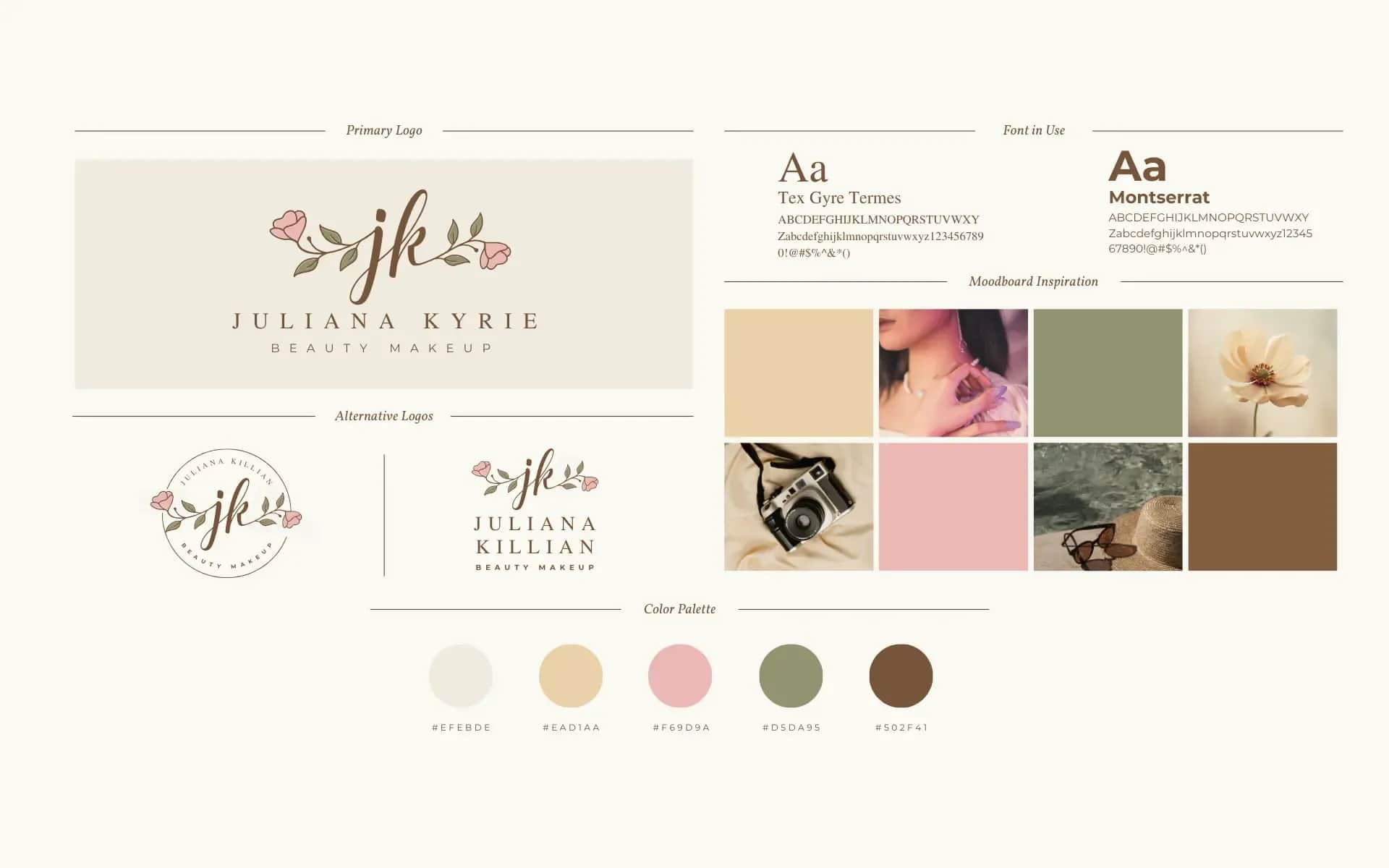
Brand guidelines are the set of rules a business follows when it uses a logo, colours, typefaces and document templates, so that a business card, a website, an email signature and a slide deck all look like parts of the same thing. The European Commission sums up the point of such a system in one sentence: it gives an organisation "a recognisable image and a unified voice in its communications" (commission.europa.eu, European Commission visual identity, read 2 October 2026). The logo itself is just one element of that system. Without rules around it, whoever is building a flyer, a post or a proposal decides on colour, spacing and typeface themselves — and within a few months the business has several versions of itself.
What such a system really contains is clearest in guidelines that organisations publish in full. We compare two: the European Commission's guidelines for partner organisations, and the EU's rules for using the EU emblem. Both repeat logo variants, a clear space and a list of prohibited uses; the emblem rules also give a minimum size, colours recorded for screen and print, and typography rules — the Commission's guidelines mention a typeface only at the signature. A small business needs exactly this core, written down on a few pages. Templates for envelopes, posters and signage can wait until the business actually needs them.
Brand guidelines, visual identity, brand book: what's what
Visual identity is the whole of it: everything a customer uses to recognise a business on sight. A visual identity system is the same whole described as a set of related rules, where colour, typeface and layout follow from the logo rather than being chosen separately for each piece of material. Brand guidelines are the document where those rules are written down. Naming isn't standardised, even among the organisations that publish them: some call theirs a style guide, others a brand book, others guidelines — and what each one actually contains varies far more than the name suggests.
The scope shows up clearest in the structure of a full set of guidelines. A short document can describe almost nothing but the logo itself — variants, clear space, minimum size, colour, a list of don'ts. A longer one extends that into typography rules and templates for actual carriers: letterhead, a presentation template, social media graphics, a website header. When you commission such a document from a designer, specify the scope by listing what it must contain, not by the name you give it.
What brand guidelines contain: two real examples
Two published documents show the range, from a minimum that describes little more than the mark itself to a fuller set with rules for colour and typography. Each has a limitation worth knowing before you borrow anything from it for your own business.
European Commission, "Visual identity — Guidelines for partners organisations", version 2025.1, 14 pages (PDF, commission.europa.eu, read 2 October 2026, PDF dated 19 March 2025). The contents cover: the Commission's logo, conditions of use, technical applications, clear space, the logo on photos, the logo on a coloured background, co-branding with other institutions and partners, the signature, and use in reports and publications. The strongest sentence in the document: "The logo is unalterable and inseparable in all its component elements. Modifying the logo in any way is strictly prohibited." Limitation: the guidelines are written for third parties using someone else's logo, so they're heavy on prohibitions and light on anything else — there is no colour palette. The EC Square Sans Pro typeface appears only at the signature, with Arial and Times New Roman as substitutes, and the guidelines give no minimum size.
The European Union, rules for using the EU emblem in the context of EU programmes 2021–2027, 14 pages (EN PDF, commission.europa.eu, March 2021, read 2 October 2026). Sections: technical specifications, pairing the emblem with a funding statement in horizontal, vertical and bilingual layouts, colours, typeface, a protected area, minimum size, what to avoid, and placing the emblem next to other logos. Limitation: these are rules for a mark used by other people, written in 2021 for the 2021–2027 programming period; the PDF was still served by the Commission on 2 October 2026.

What two published sets of brand guidelines contain
European Commission Visual identity Guidelines 2025.1; EU emblem rules 2021–2027; read 02.10.2026
The logo within the system: variants, clear space, minimum size
Variants exist because one file doesn't work everywhere. The European Commission has three: "Three variations of the logo exist but the main version to use is the horizontal version" — horizontal, vertical and a muted version. Each variant answers one constraint: a small size, a single ink colour, a dark background, a narrow format. If your logo has no variant for one of those constraints, someone will eventually make one up themselves.

Which logo variant answers which constraint
Digital Vantage, own diagram based on the European Commission’s guidelines 2025.1, the EU emblem rules 2021–2027, Facebook Help and LinkedIn Help; read 02.10.2026
Clear space is the empty area around a mark. The Commission spells out what it excludes: "no other element (text, image, drawing, figure, etc.)" may sit inside it. The Commission doesn't give its clear space in millimetres: it's drawn relative to the logo itself, so it scales the same way on a business card and on a banner. The EU emblem rules, by contrast, give an explicit minimum size: "The minimum height of the EU emblem must be 1 cm", with a smaller size allowed only on specific items such as pens. Note which dimension you're measuring — height, not width — and write that down in your own guidelines so there's no ambiguity later.
The last piece is the boundary of what you're allowed to change. The Commission adds the point that affects a logo the most in practice: "The use of special effects behind the logo, like drop shadows, is not permitted." Expect the same family of prohibitions in most guidelines: no recolouring, no changing the layout of elements, no frames, no rotating or skewing, no backgrounds that reduce legibility.
Colour: one colour, several notations
Every brand colour has to be written down more than once, because a screen and a print shop speak different languages. The EU emblem rules give the EU blue as C 100, M 80, Y 0, K 0, R 0, G 51, B 153 and #003399, and the yellow as R 255, G 204, B 0 and #FFCC00.
The split is simple. HEX and RGB are for screens: a website, social media, a slide deck. CMYK is the four-ink notation print shops use. Pantone is a swatch-book number for a colour that has to come out the same across different print shops. The EU emblem rules use it exactly that way: where only one ink is available, on clothing or merchandise, the emblem is printed in Pantone Reflex Blue. If a designer only hands you a HEX palette, software or the print shop will convert it to CMYK for you, and the colour on paper can drift from the one on screen.

One colour, four notations: screen and print
Rules for using the EU emblem in the context of EU programmes 2021–2027 (March 2021); read 02.10.2026
A second matter is the background. The EU emblem rules require "sufficient contrast" between the emblem and its background; if there is no alternative to a coloured background, "a white border must be placed around the flag, with the width of this being equal to one 25th of the height of the rectangle". In a mini brand guide it's enough to show the logo on the backgrounds you actually use, and flag the ones that are off-limits.
Typography: a brand typeface, and an office typeface
Typography in a set of brand guidelines answers two questions: what typeface do you use for brand material, and what typeface do you use for ordinary documents. The Commission's guidelines name their own typeface, EC Square Sans Pro, only at the signature, with Arial and Times New Roman as substitutes. The EU emblem rules go the other way and pick an office typeface on purpose: the funding statement is set in Arial bold because "Arial is one of the pre-installed fonts by Microsoft and Adobe software, so it is easily accessible for everyone". That's the reasoning behind the split we recommend — a brand face for headlines and marketing material, and an office face available on virtually any computer for contracts, letters and the email signature. A document opens on the recipient's computer, which may not have your brand typeface installed. If your proposal in Word has to look the same at the client's end as it does at yours, your guidelines need to name a typeface the client is likely to already have.
A separate matter is the font's licence. Terms depend on whoever supplies that particular typeface, and need checking before you use one in a logo. Example: Canva's Content License Agreement, §9, bans using content from its library in a trade mark, but explicitly excludes fonts from that ban ("excluding fonts"; the page gives no version date, read 2 October 2026). What that means for a logo built in Canva is covered in logo design.
Where the system works: carriers, from a business card to an email signature
A system proves itself on carriers, and a full set of guidelines shows how many there can be: a business card template, letterhead, a poster, a leaflet, envelopes, a tote bag, a t-shirt, an email signature, a mailing template, a presentation template, social media and web graphics, and signage. A small business doesn't need a template for every one of these. It needs templates for the ones that go out to a client every week: the email signature, an offer or presentation template, a business card if you hand them out, and the graphics for your profiles online.
Online, a mark most often works at a small size and inside someone else's frame. Facebook says of a page's profile photo: it "is cropped to a circle" (Facebook Help, undated page, read 2 October 2026). A logo that fills a square right into the corners will lose those corners. LinkedIn warns: "Your logo image will be displayed on both light and dark backgrounds" and recommends testing on both (LinkedIn Help, page marked "Last updated: 1 month ago", read 2 October 2026). That's exactly what the logo variants from the earlier section are for: a negative version for dark backgrounds, a simplified mark or just the symbol for a circular crop. Pixel sizes for a favicon, Facebook and LinkedIn are collected in logo design.
Photography and graphics style belong to the same system as colour, but come with their own sources and their own licensing pitfalls — a subject for another article, not this one.
A mini brand guide for a small business: a checklist
A mini brand guide is the core shared by both documents above, written down on a few pages. The list below is our own distillation of what recurs in published guidelines, cut down to the scale of a one-person or a few-person business:
- The primary mark, with a note of what it's built from: symbol, name treatment, and the typeface the name treatment is based on.
- Variants: a simplified or short version, horizontal and vertical if they exist; colour and monochrome; positive and negative.
- Clear space, defined relative to the mark itself, with a diagram.
- Minimum size in millimetres for print and pixels for screen, with a note of which variant applies below that size, and whether you're measuring width or height.
- Colours in HEX and RGB for screen, and CMYK for print; a Pantone reference if you print in a special colour.
- Backgrounds: the logo on the backgrounds you actually use, and examples of backgrounds that are off-limits.
- Typography: a brand typeface with its weights, an office typeface, and a substitute for computers that don't have the brand typeface installed.
- Prohibitions, shown with examples: changing colour, proportions or layout, rotating, shadows, frames, text inside the clear space.
- Carrier templates you actually use: email signature, an offer or presentation template, a business card, a social-media avatar.
- A file list: which files exist, in what formats, and where they're kept.
The second half of a mini brand guide is upkeep, which in a small business usually has no one actually owning it by default. Write down, in the guide itself, who holds the source files and who approves an exception — a partner using your logo on their own material, for instance. Note a version number and a date too. Without one, after a year nobody knows which file is the one that's current.
Order matters as well. Guidelines describe a brand that already knows who it's talking to. If you haven't settled that yet, start with business model and target audience. Where the brand sits in a new business's buying order is shown in our guide to technology for a new business.
A mark is also rights
Brand guidelines describe how to use a logo, but they don't settle who owns the rights to it. That's a separate question, covered in full in logo design: what has to be in the contract with a designer, what you get from a Canva logo or an AI generator, and what registering a trade mark costs.
If you're commissioning a visual-identity system from a designer, hand them the checklist above in the brief as the scope of work. How to write a brief so the person doing the work doesn't have to guess is in the project brief.
FAQ
Frequently asked questions about brand guidelines
They're the set of rules a business uses for its logo, colours, typefaces and document templates, so that all its material looks like parts of the same thing. The European Commission describes the purpose as giving a "recognisable image and a unified voice" to communications. The logo itself is only one element of the system.
Both published documents we compare — the European Commission's guidelines and the EU emblem rules — repeat logo variants, a clear space and a list of prohibited uses. The emblem rules also give a minimum size, colours recorded for screen and print, and a list of recommended typefaces. A fuller system adds templates for actual carriers, from a business card to an email signature and a presentation template.
A visual identity system is the set of related rules; brand guidelines are the document that writes them down. Naming isn't standardised — some organisations call theirs a style guide, others a brand book — and what each one actually contains varies more than the name suggests. When commissioning one, specify the scope by content, not by name.
Record every colour in more than one system: HEX and RGB for screen, CMYK for four-colour print, and a Pantone reference if the colour has to be identical across different print shops. Add background rules too: a logo needs a defined minimum contrast, or a protective border, against any background it might sit on.
Usually not. A mini brand guide is enough: the mark and its variants, clear space, minimum size, colours in HEX, RGB and CMYK, a brand typeface and an office typeface, prohibitions, templates for the carriers you actually use, and a file list. Add a note of who holds the files and who approves exceptions, and mark a version number and date, because the guide will need updating.
Want to put your brand's visual identity in order?
We'll help you write a mini brand guide: logo variants, colours for screen and print, typefaces and the carrier templates your business actually uses.
Related Posts
- Technology for a new business — what to buy in week zero, and what can wait
What to buy when starting a business, from week zero to the first employee: domain, mail, invoicing, CRM, office suite, brand — with sources.
- 1.Logo design for a business — copyright, trade marks, and the files you need
Logo design for a business: the designer contract, whether a Canva or AI logo is yours, what a trade mark costs at UPRP and EUIPO, and the files.
- 2.How much does it cost to start a business in Poland in 2026? ZUS, health contribution, VAT and cash register
How much does it cost to start a business in Poland? CEIDG registration is free; ZUS, the health contribution, VAT and a cash register set the real cost.
- 3.Invoicing software in 2026 — KSeF, free tools and paid plans
Invoicing software in 2026: KSeF deadlines and the PLN 10,000 exception, free Ministry of Finance apps, paid plans, and what an invoice must contain.
- 4.Google Workspace pricing vs Microsoft 365 — plans and what you get in a small business
Google Workspace pricing from PLN 31.50 per user a month, Microsoft 365 Business Basic from €6.07. Plans, storage, meetings and AI compared side by side.
- 5.Business Model Canvas — what it is, and how to map yours on one page before you start a business
Business Model Canvas in nine fields, Lean Canvas, the Value Proposition Canvas, persona and competitor analysis — straight from the tools' own authors.
- 6.Business email — what a mailbox on your domain costs, and how to set it up
Business email on your own domain from under PLN 4 to about PLN 32 a month. Where to host a mailbox, what's free, and the SPF, DKIM, DMARC records.
- 1.